Skip to Content

Posts tagged with Facilitation

Two facilitation methods starting with a single line: Actions|Results & +|Δ

A square piece of paper with a single line drawn down the middle.
Photo by Brian Kerr.

Two simple facilitation methods you can start anytime by drawing a single line on a sheet of paper. What these are and when to use them.

These two methods require you to draw a single line to start, which makes them very easy and portable. You don’t need to think of yourself as a facilitator. Just draw a line and move the conversation along.

Actions|Results

Bring Actions|Results out when people are talking about what to do next in a situation and things get muddled.

  1. First, draw a single line somewhere everybody can see it. Write ‘Actions’ as a heading to the left side, and ‘Results’ to the right.
  2. Then, as you hear specific proposals or ideas, start placing actions to the left side of the line and results to the right.
  3. Leave plenty of space.
  4. At some point, you may choose to explain yourself. The relationship between these two is like this:
    1. We’ll take some action → to get to this result.
    2. We want this result → so let’s try this action.
  5. In most groups, you’ll hear some proposed actions (‘let’s train everyone on the new process’) as well as results (‘everyone needs to use the new process by XY date’). Keeping these two separated allows for structured thinking to arise. Encourage new connections or filling in of blanks on this basis.

At the end, a picture emerges that you can ask questions about. For any proposed result, there are probably several actions that could lead to the result—which ones are easiest, quickest, easily reversible, etc.? And for any proposed action, there’s an end result in mind—does everyone agree with the result, and how useful do we think the action will be in getting us there?

Use this picture to start choosing feasible or necessary next steps.

And the picture is helpful when looking for performance measures. Computers are usually better at counting actions than they are results. But the relationships you’ve identified between actions and results can hint toward a larger theory of change. I’ve noticed this is typically the most durable outcome of what can seem like a simple, improvised method.

+|Δ (Plus|Delta)

The second method, +|Δ, is a great way to wrap up or check out of a gathering. It’s a very popular method—you may have used it or experienced it yourself.

  1. First, draw a single line somewhere everybody can see it. Write ‘+’ as a heading to the left side, and ‘Δ’ to the right. Maybe write out ‘delta’ or ‘change’ as a caption next to the latter.
  2. Then, ask people for their feedback and write down what you hear.
    1. Pluses: what’d they like? what should we keep doing?
    2. Deltas: what should we change next time? For this, I encourage a ‘complaints with recommendation’ format, where any complaints are welcome, but a positive recommendation should come with ’em.
  3. Now the important part: act on what’s there. For recurring meetings, I like to briefly bring up previous +|Δ board(s) while announcing any agenda, format, or logistical changes happening as a result.

An encouragement

I hope you try one of these, especially if it seems a bit out of character for you. Facilitation might seem arcane, but it can be very simple.

What’s fun about these methods is that they are easy enough to do with no setup and no ceremony. And you get much of the benefit of more complex methods: the chance to slow down, think in a more structured, communal way, and organize ideas spatially.

Questions along the way

Looking down into a rocky beach at low tide, with a weathered wooden beam in few; a few barnacles and lichen live on this beam.
Photo by Brian Kerr.

The Periodic Table of Questions, ICA’s ORID, Liberating Structures’ W3, and more. How might we organize questions, and to what end?

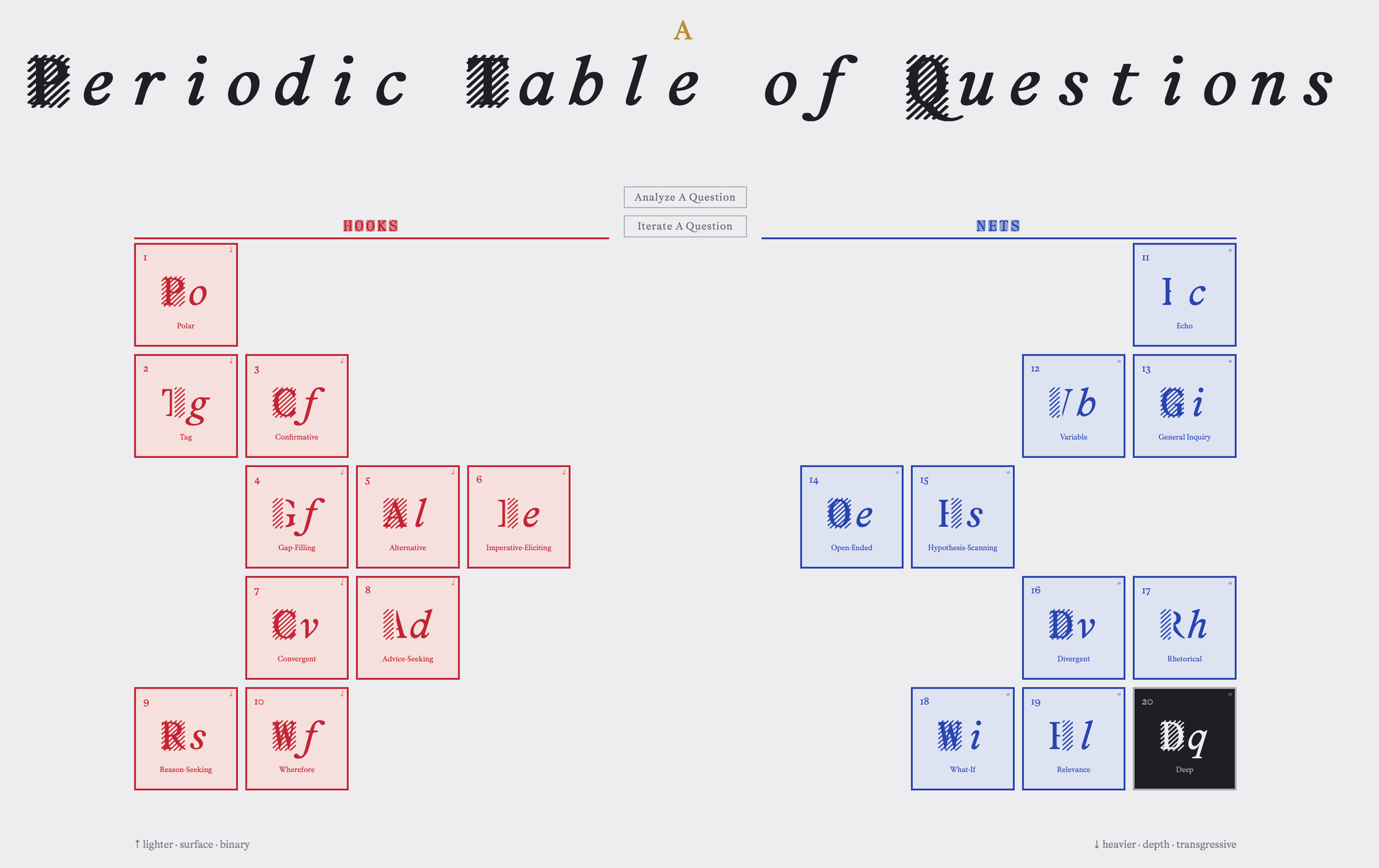
Dan Klyn offers this Periodic Table of Questions. 20 genres of questions, arranged spatially from left to right as hooks (questions with bounded answers) and nets (questions with open answers), and from top to bottom on an index I sense intuitively but still can’t describe as concisely as he does:

Image of a Periodic Table of Questions, available online at https://danklyn.com/questions.html

This is immediately interesting to click around. Click on each for an example question. Dan has a talk and draft book chapter available.

Also, it’s immediately useful. You can provide a question and the thing will guess what kind of question it is. You can ‘iterate’ a question and it’ll give you restated versions of your question across all 20 genres. (Must be some ill-begotten LLM device behind the scenes; re-roll if you don’t like what you see; use the cut-up method to swipe only the results that are meaningful to you. Meaning comes from you, not the randomization device.)

I told Dan it reminded me of ORID from the Institute for Cultural Affairs:

ORID as an Underlying Structure for Effective Meeting Design
We teach ORID as the structure of a Focused Conversation. However, it is much more than that. Since it reflects the natural steps in how human beings process information, it is also useful as an underlying “meta” structural design for a facilitated event. Any appropriate facilitation tools can be used at any of the four […]

This is how ICA teachers advise a facilitator to arrange a ‘focused conversation’—one of several basic extremely valuable facilitation methods they teach. To design a focused conversation, you write up a sequence of questions in deliberate sequence across 4 levels: objective, reflective, interpretive, and (the most unlovely word of all) decisional. The Periodic Table of Questions has helped me arrange questions for one focused conversation so far, and I look forward to more. I do a good job of figuring out what the questions should be, but never want to slow down and get the wording just right. And one feature of the focused conversation is that if you have great questions in the right order, there is very little else to do. A group then brings itself to the appropriate ending point for a meeting or activity.

A simpler version of this approach, one which trades away a lot of nuance for being easier to do, is the ‘What, So What, Now What?’ (W3) liberating structure:

Liberating Structures - 9. What, So What, Now What? W³
liberating structures, social invention.net, microstructures, disruptive innovation, behavior change, collaboration, social invention, diffusion of innovation, strategy, transformation, heuristics, complexity science, emergence

W3 is based in part on the work of Chris Argyris (who I’ve written about before—

‘Undiscussables’ 45 years later: still here, still bad & somehow even worse
Revisiting Argyris’ ‘undiscussables’ as emergent, unwanted behaviors & as features of organizational control. Keeping courage, showing kindness.

—and whose writing and ideas I rely on in my consulting practice). The ladder of inference shared in the W3 method feels like a fast-and-loose alternative to ORID.

Simpler still is to ask a single question, my own shortcut method:

“What did you notice?” → End your meetings with this short, powerful question
The simplest technique I know.

When this works, it is because starting with something at the “data” level (as per the ladder of inference), or the “objective” level (per ICA’s ORID/focused conversation), or the lighter/topmost “net” questions (per the Periodic Table of Questions) is always enough to get a conversation started, and often enough to keep a conversation moving along, of its own accord, to its conclusion.


One last point. Jerry Weinberg had remarkable advice about not inflicting help—by which he meant offering known, or supposed, answers before someone is ready to ask for help. Over the last 20 years, this idea has made all the difference for me. The distinction between being (a) this dreary little (presumed) know-it-all and (b) a helpful colleague. Which is to say: people might not want the answer to the question you wish they would ask, but they might listen to your question if you ask it with kind curiosity, in the right way, and at the right time.

With paper, glue & scissors: how little zines can make a big difference

Two printed and folded mini-zines on a tabletop next to a bottle of glue, two wooden blocks, and a pair of scissors.
Photo by Brian Kerr.

Two ways to make an 8-page mini-zine using stuff you already have—and three reasons why you might do this.

Today, two ways to put together a specific type of mini-zine—an 8-page cut-fold-&-glue apparatus you can make on letter paper using any printer on hand. These are:

  • Method 1: a word processor, and
  • Method 2: whatever design-y software you like & a free web-based imposer.

But first: ↓

Why might you want to make a zine?

  1. For ‘networking’ or other events, it is useful to have a zine on hand to give to people instead of a business card (dated) or nothing at all (the default). Share something relevant, personal, and provocative, as well as your contact info.
  2. For in-person facilitated events, making a customized zine helps keep everyone on the same page. Laying out facilitation instructions as well as working/writing space helps guide participants through an activity. It also eases your job as facilitator by reducing explanation and grounding group work in a defined, page-by-page progression: e.g. you can ask everyone to turn to a specific page and keep things moving along. I’ve found that participants appreciate having something that encloses the entire activity. For those who want to read ahead or worry about structure or timing, the zine satisfies. It is also a signal that you take things seriously. People will notice that you created a custom zine for this specific gathering, and printed and folded the right number of them. This does not take long to do, but makes an impression.
  3. Instead of a plain old handout for a presentation. It’s more fun to flip through a zine than flap a single sheet of paper. You also get to make some choices about structure and organization of the material. At the end of a talk, zines tend to go into pockets or bags while handouts are discreetly dropped into the trash.

Method 1: a word processor

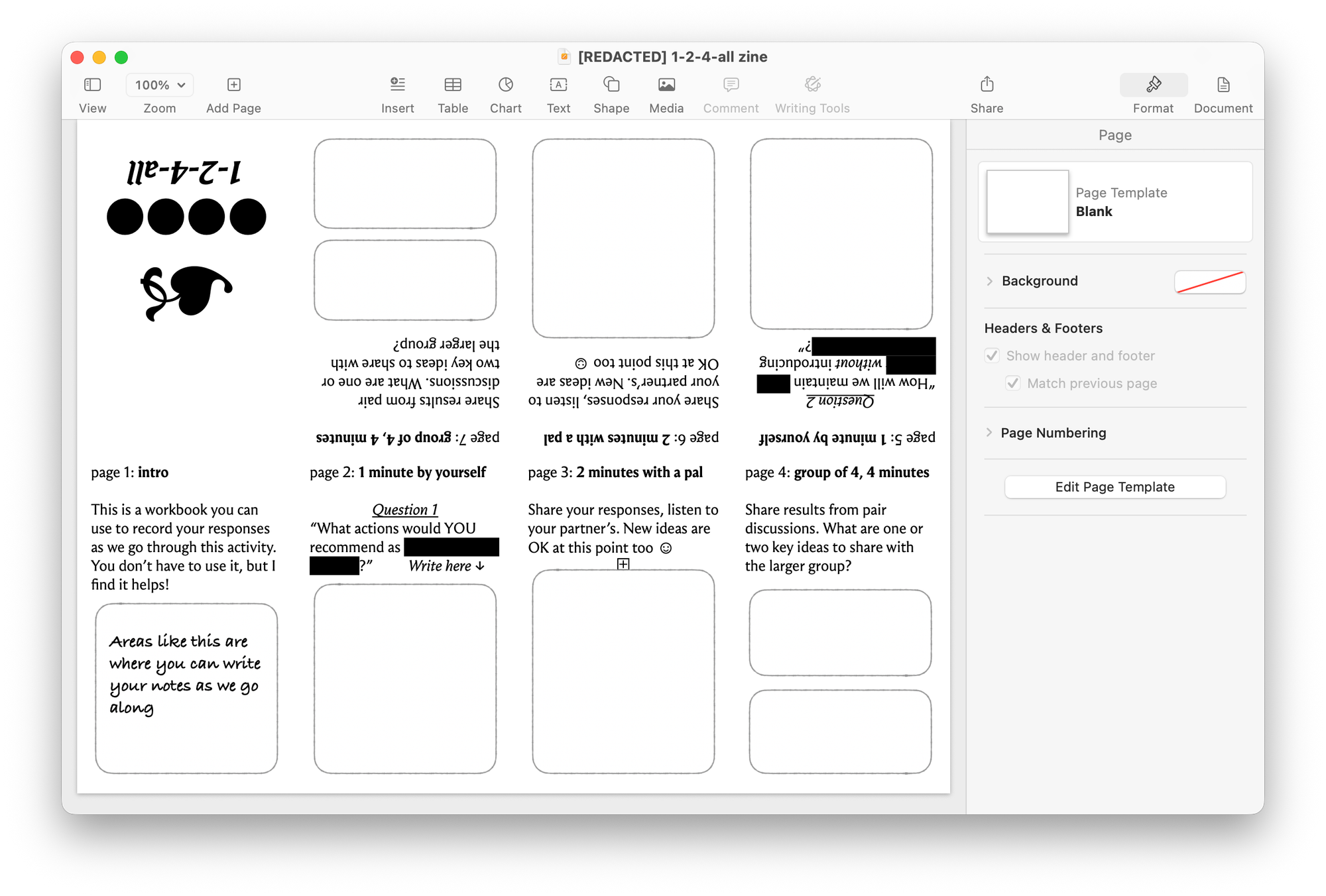
This is a simple but annoying method. Start with a ready-made template for your word processor of choice, and then fill in the blanks to lay out your zine. Here’s an example in Apple Pages, using these wonderful templates from Jess Driscoll:

Screenshot of Apple Pages with an 8-page mini-zine laid out in a 4x2 grid for printing. Pages 5-8 are upside down across the top row, and pages 1-4 are right-side-up along the bottom row.
8-page mini-zine for a 1-2-4-all facilitated activity. Specific topic and questions redacted.
💡
In this example: a group was dealing with an organizational change that would split their one team into three parts. The discussion was about how the team could preserve some norms and quality standards despite the re-org.

What you may detect in the screenshot is that laying out pages 5 through 8 in this method is comically irritating. The advantage is that it’s simple to do: fill in and print. Word processing upside-down is possible but not recommended. As a result, I prefer the next method instead.

Method 2: whatever design-y software you like & a free web-based imposer

📖
Lingo alert: imposition is a printing term for pre-press arrangement of material on the page so it can then be printed, cut, folded, and bound.

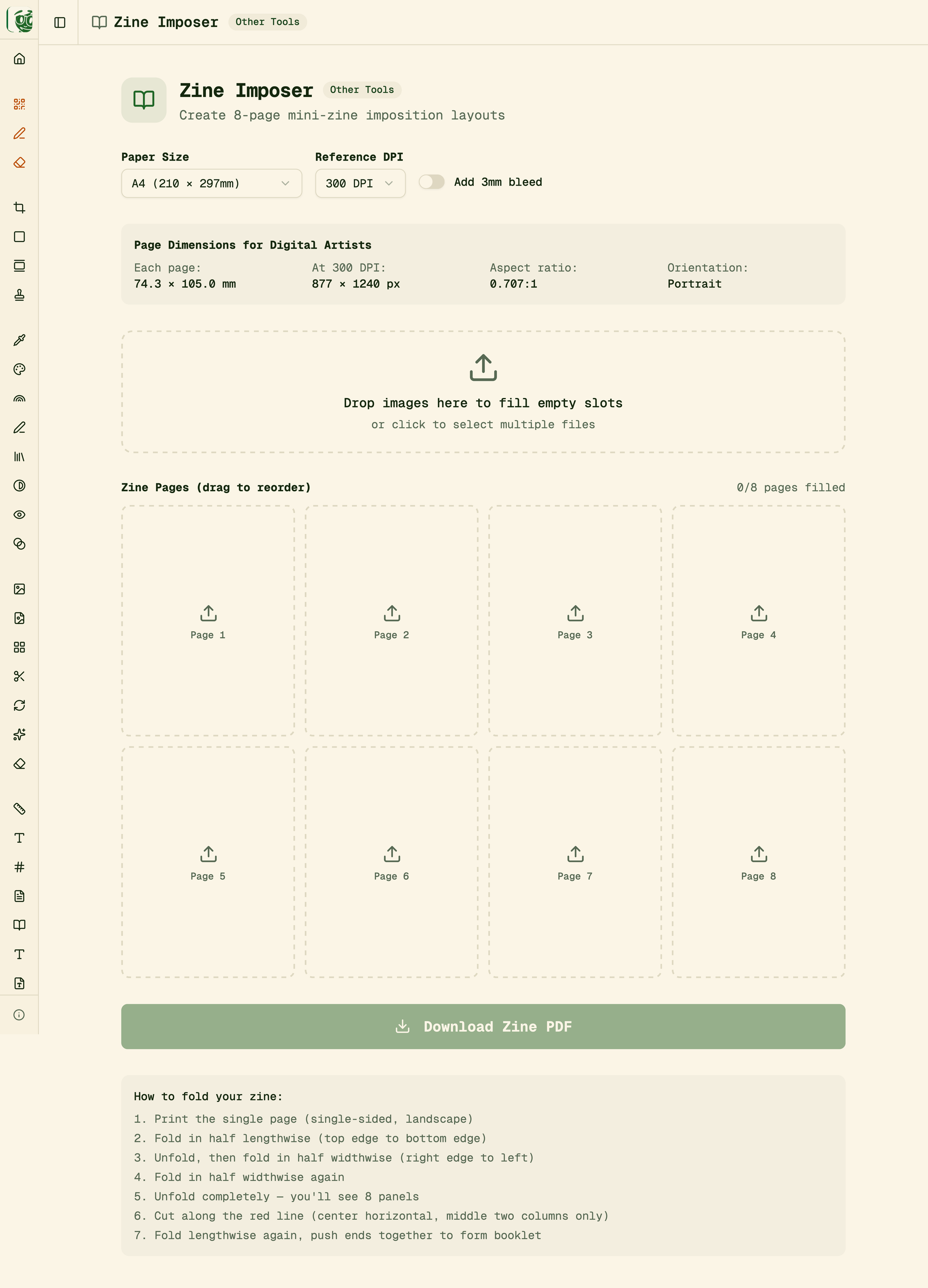
This method uses delphitools’ amazing online zine imposer to lay your zine out for printing. Specifically, the tool takes a set of appropriately-sized individual pages and gives you a printer-ready PDF in a layout similar to what you saw in method 1.

A full page screenshot of the Zine Imposer tool.
delphitool’s Zine Imposer.

Use this thing by first selecting your paper size and then noting the dimensions it gives you for the zine pages. Next, in your software of choice, set your page size to these dimensions, and begin. You’ll want to create 8 pages, including front and back cover, and then export them as images to pull back into the zine imposer.

Options here include Keynote or other presentation software—or pretty much anything that can lay out images and text on pages.

I use Canva, where it’s simple to create pages at the right size and adhere to whatever aspects of the style guide seem important at the time. My only advice is to get the physical size of the page onscreen to roughly match what it’ll look like in print. Given Canva and my particular combination of hardware, that ends up being a 33% zoom.

If it seems like this section is a glorified link to the zine imposer, you’re right. It’s a great tool (and part of a larger collection of web-based goodies worth investigation).

What to put in the zine

Here are a few places to look for starting points or inspiration:

  • I’ve zine-ified various templates and handouts from my own downloads page. You might have a similar collection to work from.
  • Dan Klyn and colleagues have a great zine introducing their BASIC framework. (There’s also a video where Dan shows you how he prints and folds the things.)
  • For facilitated gatherings, use a step-by-step approach as shown in the method 1 example above. Take the instructions you’d project or write onto a whiteboard and put them into the zine.

If you want to put your contact information on the back page, use a QR code generator. Point it to your web site, a social media profile, or newsletter sign-up page. Make sure you list the exact page it’ll take someone to and what they’ll find there.

I’ll send you one

I’ve resisted putting PDFs of any zines online, preferring to keep it somewhat analog. But I’ll happily send you one—let me know where to send it.

4 favorite Liberating Structures for continuous improvement

Weird flowering moss on an very old wooden shed.
Photo by Brian Kerr.

Getting specific about facilitation methods & how to incorporate them into the work.

I’ve previously shared an introduction to Liberating Structures, the methods that filled the “facilitation gap” in my own continuous improvement practice. These 4 Liberating Structures have been most important to my continuous improvement practice.

During planning

  • Ecocycle Planning—an initial conversation that can help an uncertain or newly formed team figure out what to work on. Starting with a portfolio-level listing of major systems or responsibilities, people locate each of those in its overall lifecycle. The resulting ‘ecocycle’ is a big picture of things that need fixing, things that could be skillfully closed down, and things that need to be nurtured into further growth. There’s your schedule of continuous improvement projects.

During an improvement activity

  • TRIZ—a scavenger hunt for existing system behaviors that produce bad outcomes. Purposefully designing a broken system is fun. Then, insight comes when people look for similarities between the bad system they’ve imagined and the way things get done today. TRIZ lets groups see how their collective work is both interrelated and necessary—and where there is room for creative destruction.
  • 25/10 Crowdsourcing—a machine for generating bravery, starting with the question: “If you were ten times bolder, what big idea would you recommend?” The activity ends with a tantalizing presentation of the weirdest ideas that were elevated or supported by the whole group. There will be a few ideas you can go do right away, ‘ten times bolder’ premise be damned.

Afterwards

  • What/So What/Now What—a group closing reflection and commitment. Can scale up or down, but this is the smallest possible closing that helps people make sense of what happened and to decide what’s next.

Look, they’re all good

There are dozens of Liberating Structures. Even if you are familiar with some of them, others will be new. I encourage you to seek them out. For example, I only started using Ecocycle Planning in the last year or so, but it has already gotten me out of a couple real pickles.

November 14, 2024: Edited for length.

Using Liberating Structures to facilitate continuous improvement

Using Liberating Structures to facilitate continuous improvement
Photo by Brian Kerr.

You’ve gathered everyone together around a problem. Now what?

“Five conventional structures guide the way we organize routine interactions and how groups work together: presentations, managed discussions, open discussions, status reports and brainstorm sessions. Liberating Structures add 33 more options to the big five conventional approaches.”

So much of continuous improvement comes down to gathering a small group of people together (ideally with snacks) and opening a space so that everybody can decide what to do next.

The Lean books and teachers I learned from taught me what needed to happen—the observations, diagrams, analysis, ideas, and plans—but couldn’t convey how to get all this to occur within groups of people who were happy, unhappy, skeptical, annoyed, burned-out, eager, curious, tired, distracted, in pain, lost in thought, worried, hungry, or optimistic.

Facilitation is its own separate skill.

Like the other so-called “soft skills,” it is hard as hell.

But eventually, Liberating Structures gave me the methods I needed.

No new thing under the sun

Each Liberating Structure is a recipe for a small, generative group interaction. Flip through the collection and you’ll find short definitions and plenty of examples, along with detailed, insightful facilitation guides.

As you explore, many of the formats and activities might seem familiar—and for good reason. Very little of this work is original, which is why nearly all of it is useful. For example, the What, So What, Now What? Liberating Structure is one particular expression of a device you might have seen in academic or business writing (as Chris Argyris’ ladder of inference) or in community development (my teachers at the Institute of Cultural Affairs call it ORID, an unlovely contraction of “objective, reflective, interpretive, and decisional”). The point of this particular Liberating Structure isn’t to be innovative, but instead to give just enough structure to help a group to listen and reflect on its shared experience. And it, like all the others, is offered with attribution and links to further reading to satisfy the eggheads.

Most of the Liberating Structures are small, with time commitments beginning at around 15 minutes. As you practice them, you may find yourself planning events by chaining a sequence of Liberating Structures together. There’s even a Liberating Structure for having group plan its own event—what my friend Dan calls choreography, but the Liberating Structure is called Design Storyboards.

And Liberating Structures are a great boost to continuous improvement efforts because they loosen up hierarchies and create new ways for people to learn from one another. This is an important part of Lean, and it’ll happen eventually—but some carefully deployed Liberating Structures can help things along. Some of the structures, like Ecocycle Planning, fit directly into the portfolio planning and management systems that sustain continuous improvement over time.

Getting started

The stuff is available online and is free to use. Read up on the Liberating Structures web site, starting with the LS Menu.

I recommend the excellent, free LiSA app for your phone or iPad. (LiSA also runs on recent Macs.) LiSA is great for quick reference, as well as for working out an agenda using a chain of Liberating Structures.

Beyond that, the very best way to learn Liberating Structures is to watch, do, and teach. (It’s also the best way to learn anything.) For this purpose, my friend Alyssa recommends this monthly international, online meetup.

Big changes, small changes

It’s only fair to let the Liberating Structures folks have the last word. Because what they want is what I want, too:

“We want everyone to learn to foster big changes by inviting people to make small structural changes in how they work together.”

Premortem: before starting a new project, learn why it will end in failure

A walking path through a forested gulch. A neighborhood bridge goes overhead, partially obscured by the trees.
Photo by Brian Kerr.

A simple method for uncovering big, ‘undiscussable’ risks to a project.

audio-thumbnail
Podcast episode 0035: Premortem
0:00
/547.264

More podcast episodes online or in your favorite app.

Identify project risks using this fun, thought-provoking 15-minute method to capture wisdom from the people who know best—those who will do the work and those who will be affected by it.

It’s the venerable project premortem.

I recommend this method if you’re leading a project in your own organization. And if you’re a consultant, like me, it can be a significant information-seeking behavior at the beginning of a project.

The underlying capability is prospective hindsight. Here’s a definition from Gary Klein, in his HBR piece from 2007 on premortems:

Prospective hindsight—imagining that an event has already occurred—increases the ability to correctly identify reasons for future outcomes by 30%. We have used prospective hindsight to devise a method called a premortem, which helps project teams identify risks at the outset.

The premortem is not a new idea—this 2007 article popularized the technique. However, I keep using it because each time I do, I learn things that are valuable to know at the beginning of a new project—and particularly with a new client.

The power of the premortem is this:

  1. People will just tell you things if you ask them nicely.
  2. And if you ask using prospective hindsight, they will come up with surprising answers, sometimes even mentioning their organization’s ‘undiscussables.’

A few things I’ve learned from premortems

  • That the current effort was the second attempt, and therefore doomed to failure for the same reasons the first effort failed.
  • That the current effort was the third attempt, etc.
  • The existence of a specific policy making the intended change impossible, and that policy-makers were not involved in designing or selecting the project.
  • That the ongoing budget to support this work had already been allocated to a particular technology, program, or team.
  • That people don’t trust or believe their leadership, or the project’s sponsors, or one another.
  • Various discoveries about organizational problems in communication and clumsiness in making changes.

These were all things worth learning quickly—as in, cheap and early—so that possibilities remained for adjustment or better awareness of the environment.

Here’s how it’s done: running your premortem

  1. Before the meeting, write a simple scenario. Something like: “It is December and our project has failed spectacularly. As the first snow falls, we gather together and ask—what happened? Why did this fail?” Be precise about the future date: maybe 2 months after the presumed project completion; link the date to some major event or local seasonality.
  2. Schedule 15 minutes in a project kick-off meeting to run the premortem.
  3. At the start of the premortem, state the scenario and ask the question.
  4. Allow 1-3 minutes for individual reflection.
  5. Offer an anonymous feedback form and invite participants to provide their responses. Clearly state how you will use these, for example, that individual responses remain anonymous, but you will share themes and takeaways with the group and with project sponsors.
  6. After the individual reflection time is complete, open up for a brief discussion across whatever participation modes are available. Acknowledge and thank people for their responses. Do not attempt to problem-solve or diagnose right now, but make it clear you’ll be doing so later. If project sponsors, execs, etc. attend, you will have to coach them on this behavior in advance, the message being: we’re listening now, we’ll problem-solve afterwards.
  7. Close with sincere thanks and by telling people where and when you’ll share takeaways from the premortem—ideally with planned remediations for each.

An encouragement

The project premortem concept may seem a little weird. It is.

But it’s a great way to show up and listen. The simple act of listening to people and adjusting based on what you hear is wonderful.

And, almost as a side effect, the things people mention might be the things that doom the project to failure—or the things that, adjusted and kept in mind, might make it a great success.

October 7, 2025: Edited for length & added new photo.